Kataban Blog
Trader Akihabara: Which Floor Has Retro Games, and How to Pay
Trader is one of the biggest game shops on Akihabara’s Chuo-dori, and the building is easy to misread from the street: eight floors, of which only two sell games. Walk in without a plan and you can spend twenty minutes among figures before you find the cartridges. This guide covers which floor to go to, how to find a specific game without reading Japanese, and how you can pay.
- Where: Trader Main Store Building (トレーダー本店ビル), 4-2-1 Sotokanda, Chiyoda-ku. The shop moved across Chuo-dori into this new building in May 2024, so older maps and guides may still show the old site.
- Hours: 11:00–20:00, every day, according to Trader’s store page.
- Games are on two floors: 1F is Nintendo, used and new, including overseas releases. 2F is PlayStation and Xbox, also with overseas releases, plus retro games, DVDs, Blu-rays, CDs and game books. 3F–5F are figures and models; 6F–7F are adult; B1 is the buyback counter.
- Paying: cash, major credit cards including UnionPay, transport IC cards such as Suica, and several QR payment apps including Alipay, WeChat Pay and PayPay.
- Before you go: look your games up on Kataban and note each Japanese title and product code (型番).
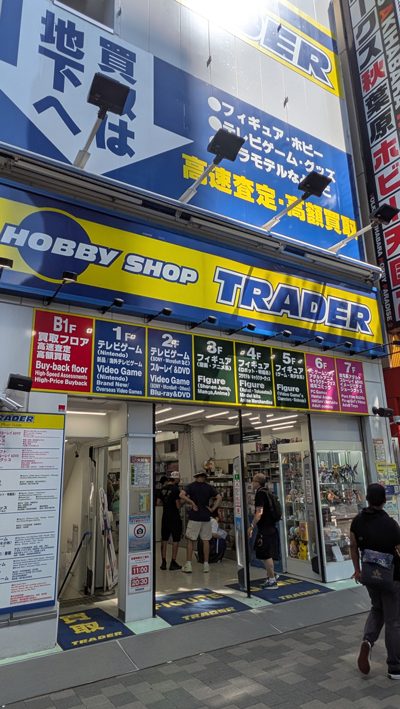
Address, hours, floor guide and payment methods are from Trader’s main store page (checked 14 November 2026). The move into the new eight-floor building (B1–7F, reopened 23 May 2024) is from Hermitage Akiba’s report, and the address matches Trader’s page. Phone: 03-3255-3493.
Which floor of Trader sells retro games?
Start on 2F. Trader’s floor guide lists retro games there, next to used PlayStation and Xbox software and the overseas releases for those systems. 1F is the Nintendo floor — used and new software, used overseas releases and new-game pre-orders — so if the retro game you want is on a Nintendo system and is not on 2F, check 1F too. The guide does not say how the two floors split older Nintendo software, so it is worth walking both.
The other six floors are not games. 3F, 4F and 5F are figures, plastic models and character goods; 6F and 7F are adult products; B1 is where you sell, not buy. If you came for cartridges, the lift buttons you need are 1 and 2.
Does Trader sell overseas versions as well as Japanese ones?
Yes. Trader’s floor guide lists used overseas games (中古海外ゲーム) on both game floors: Nintendo releases on 1F and PlayStation and Xbox releases on 2F. That makes Trader one of the few places on Chuo-dori where a visitor might find the North American or European version of a game, not just the Japanese one. Do not assume, though: most of what is on the shelves is Japanese. Kataban’s search result tells you the Japanese title to look for, and whether that Japanese release works on North American and European hardware, so you know whether you need the overseas copy at all.
How do you find a specific game on the shelf?
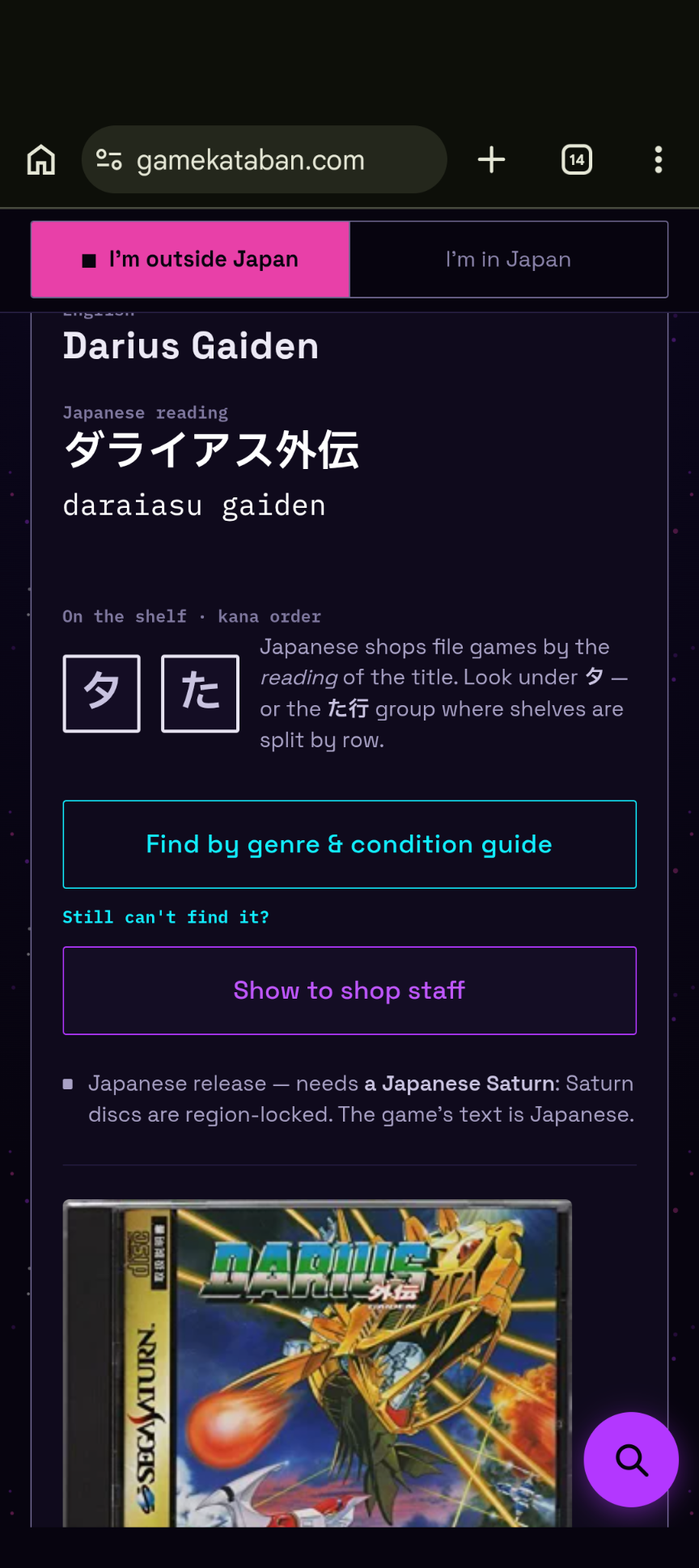
The same three steps work here as anywhere in Akihabara. Search the English title on Kataban first and carry three things into the shop: the official Japanese title, the product code, and the title’s first kana.
- Pick the right floor and system. Nintendo on 1F, PlayStation, Xbox and retro on 2F. Narrowing to one console cuts the search from thousands of spines to hundreds.
- Match the Japanese title. Hold Kataban’s result next to the spines. You are matching shapes, not reading.
- Confirm with the product code. The code on the cartridge label or case spine tells two same-named releases apart.
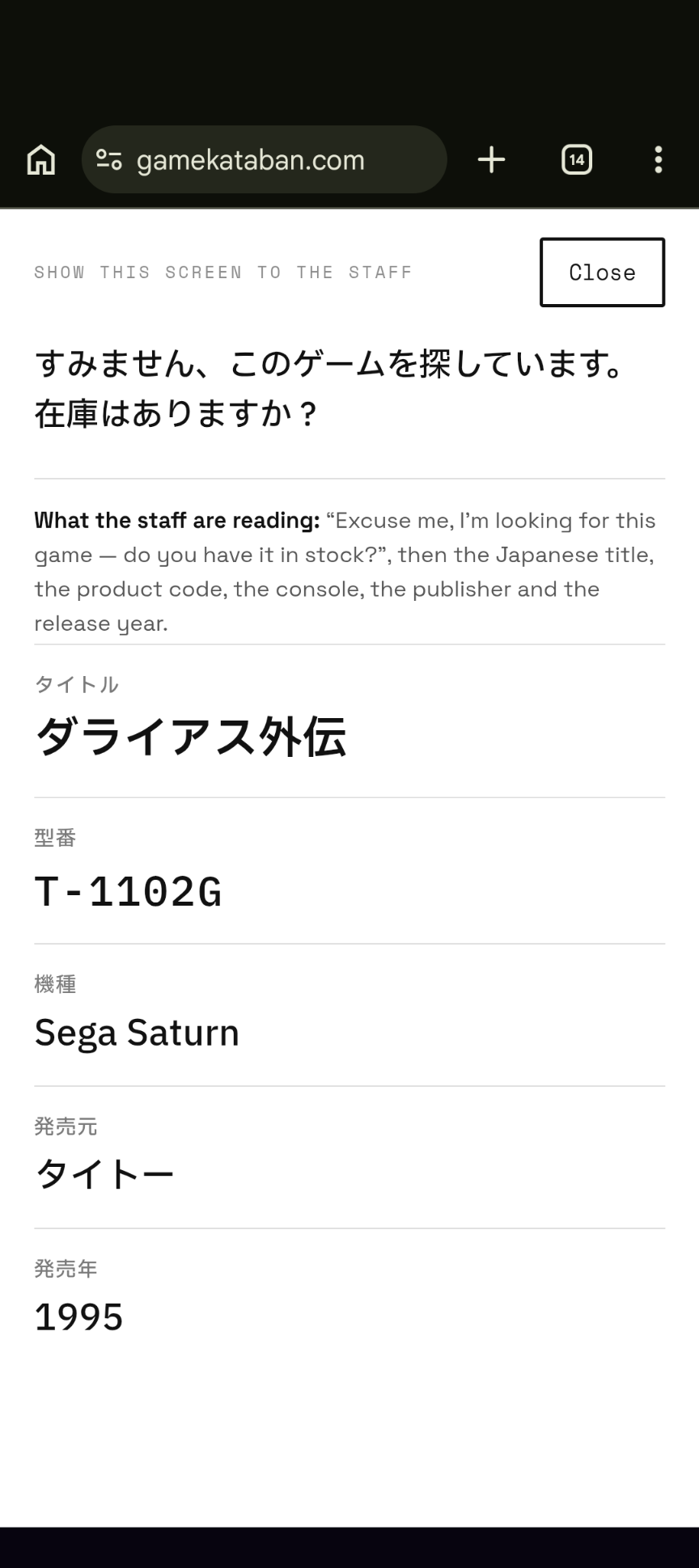
If the game is not on the shelf, or it is behind glass, tap Show to shop staff on the Kataban result. The screen switches to the Japanese title, the product code and a ready-made question in Japanese — whether it is in stock, whether you can see the one in the case, whether it comes with box and manual — and the staff member taps an answer on your phone.
How can you pay at Trader, and is it tax-free?
Trader’s store page lists more ways to pay than most game shops: cash; Visa, Mastercard, JCB, American Express, Diners Club and UnionPay; transport IC cards such as Suica and PASMO, and iD; and the QR apps WeChat Pay, PayPay, Alipay and Alipay+. If you are visiting from Taiwan, Hong Kong, mainland China or Korea, there is a good chance one of those is already on your phone.
The store page does not mention tax-free shopping. Ask at the register before you pay — the Show to shop staff screen in Kataban has a tax-free question ready in Japanese. Since 1 November 2026 tax-free shopping in Japan works by refund: you pay the tax in the shop and get it back at the airport. Our guide to the new tax-free system explains the steps.
Trader or Super Potato?
They are a few minutes apart on the same street, so the honest answer is both. Super Potato is a retro specialist on three floors; Trader is a general game shop with retro on one floor and current and overseas games on two. The same title can be on one shelf and not the other, or cheaper at one of them. Our Chuo-dori walking route takes in both, along with Mandarake and Retro Game Camp.